SmartDeploy: Credential Abuse
Authored by Chance Pearson, Packetlabs Offensive Security Team Lead
Versions of PDQ SmartDeploy prior to 3.0.2046 relied on static, hardcoded encryption keys to protect stored credentials.
As a result, low-privileged users could recover and decrypt high-value secrets, including local administrator and Active Directory domain-join credentials, from the registry of managed hosts or from OS deployment artifacts on deployment servers.
Originally, we were surprised that someone beat us to a chain of vulnerabilities that was used in an enterprise’s Active Directory environment.
Therefore, credit first goes to SpecterOps’ Garrett Foster (@unsigned_sh0rt) for MITRE’s assignment of CVE-2025-52094 and CVE-2025-52095, and for publishing his findings ahead of Packetlabs. We appreciate the quality of his research and the opportunity to build upon and complement that work.
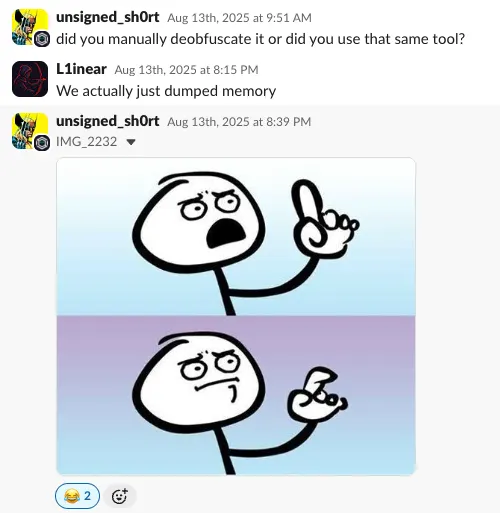
Our approach and Garrett Foster’s approach differed slightly. Packetlabs took a relatively simple approach. In contrast, Garrett Foster’s research explored deeper reverse engineering paths, including targeted analysis of SDCommon.dll, SmartAssembly protections, walking back the obfuscation using Redgate, and the development of proof-of-concept tooling.
Our team gained valuable insight from reviewing Garrett’s methodology and findings. This post is not intended to replicate or supersede that work, but rather to serve as a complementary perspective that demonstrates an alternative approach that arrives at similar outcomes.
PDQ SmartDeploy
PDQ SmartDeploy is a Windows operating system deployment (OSD) solution that also offers limited software deployment functionality through agent-based management. It is positioned as a more approachable alternative to SCCM, with a significantly lower learning curve.
Many Fortune 500 companies opt to use this over traditional SCCM for imaging devices in a quick manner. This offline tool is also available for a free trial, which users can download after signing up.
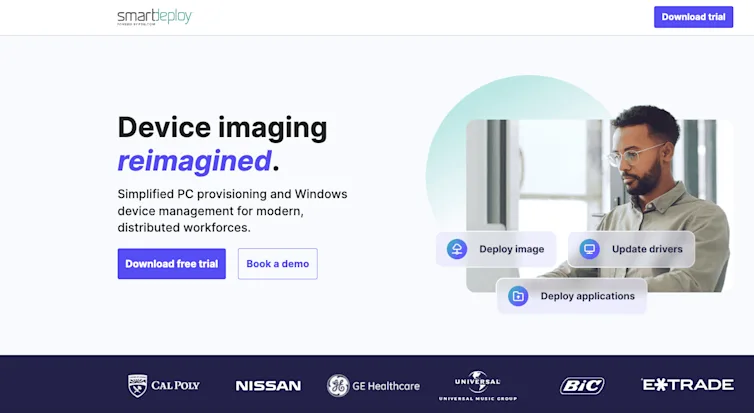
Figure 1. SmartDeploy Landing Page Showing Various Organizations Who Use the Tool
During Packetlabs engagements, several of our clients were observed using PDQ SmartDeploy for operating system deployment and related administrative tasks. SmartDeploy relies on Answer Files, which are XML-based configuration files used to automate deployment workflows.
These Answer Files can be configured to store local administrator credentials, network credentials, and Active Directory domain credentials to facilitate unattended deployments.
From the context of a low-privileged user, it’s possible to recover a SmartDeploy Answer File from the environment. This file contained encrypted credential material, including domain-level credentials and the local account used by SmartDeploy during deployment.
While the credentials are encrypted by the SmartDeploy application, their presence in a retrievable configuration file introduces a potential attack surface if access controls are insufficient.
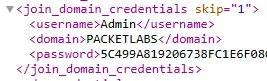
Figure 2. XML File Shows Encrypted Password to Join the Device to the Domain During Imaging

Figure 3. A User is Also Provided with Share Access to Grab Files to Deploy to the System
This led to various vulnerabilities within the SmartDeploy application to be found, which could be used for various purposes and methods within an organization.
Vulnerability 1: Authorization Bypass on SmartDeploy Thick Client
SmartDeploy, when launched, requires users to authenticate using an account created during the online sign-up process.
This account is the smartdeploy.com account that can be used to download the binary, as well as manage subscription-level access.
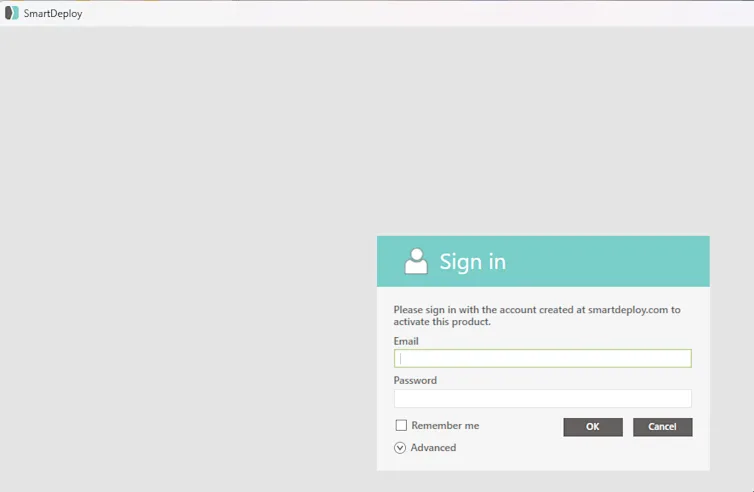
Figure 4. Application Launch Screen
Once a user has logged into the application, it stores that user's credentials in a file located at C:\Program Files\SmartDeploy\SmartDeploy\Resources\Configuration\auth.json.
This file is an encrypted file that, when decrypted, contains the user’s password, username, and other information. The password is also encrypted using the same encryption.
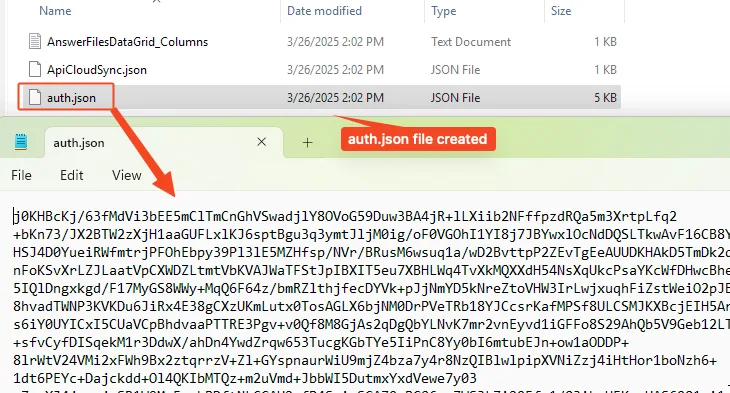
Figure 5. auth.json File Created Containing User Information
The auth.json file remains in this directory even when the application is closed. However, any time the Smart Deploy Console is opened it requests users to input the credentials again. The Smart Deploy Console application interacts with various Smart Deploy files to launch and modify tasks.
The flow of the application allows a user to modify, for example, answer files from the Smart Deploy Console binary.
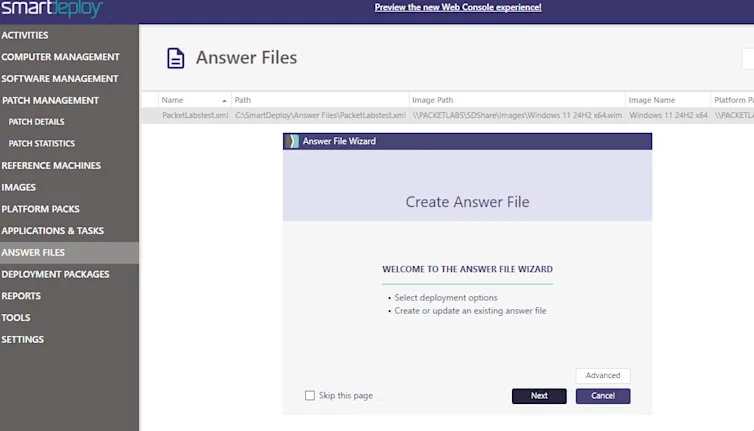
Figure 6. Editing AnswerFiles via SmartDeploy
Using the Process Explorer tool from SysInternals, it was found that Smart Deploy Console interacts with these pieces by spawning processes with command line arguments.
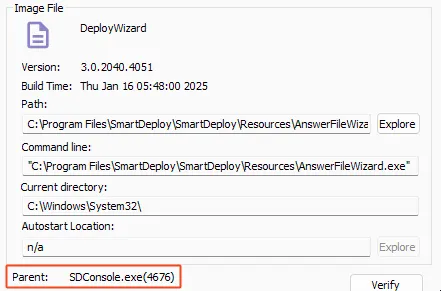
Figure 7. SDConsole.exe Launching AnswerFileWizard
By sending these arguments via the command line, the authentication process can be skipped, allowing users to modify and save files through the tools.
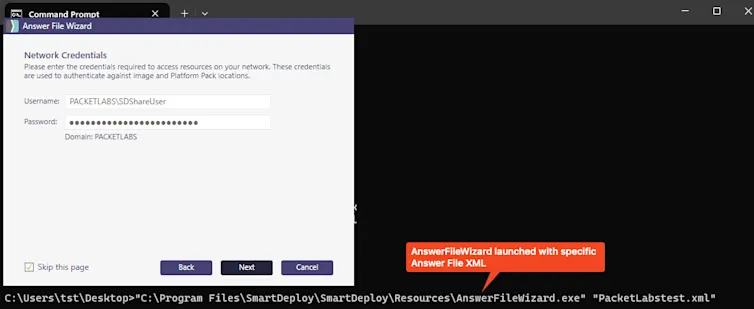
Figure 8. AnswerFileWizard.exe Launched via cmd.exe
Vulnerability 2: Recovering Plain-text Credentials via Memory
Answer File XMLs (Figure 2 and 3) can be saved, storing credentials within the file. These passwords are then encrypted in the XML to stop attackers from recovering these passwords if the file was obtained.
By navigating through the steps of the AnswerFileWizard.exe, it is possible to get to a view that contains the configuration for Network Credentials.
While the password cannot be seen, as its masked, the files can be edited.
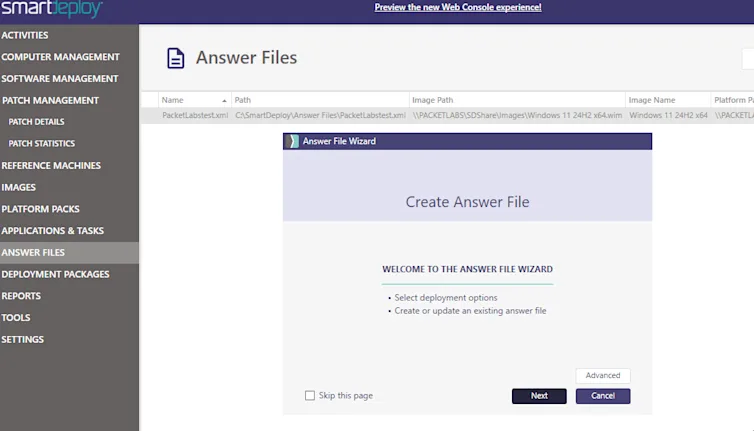
Figure 9. Answer File Wizard Network Credentials View
Our initial approach differed from Garrett’s post. There wasn’t a lot of success about how credentials were stored with this wizard, hence we opted to wrap the password with known text.
This led to adding a known text around the password such that the password was wrapped to be PCKTactualpasswordPCKT.
Once modified, the next button was pushed, which resulted in the application hanging for several seconds before the next view was displayed.
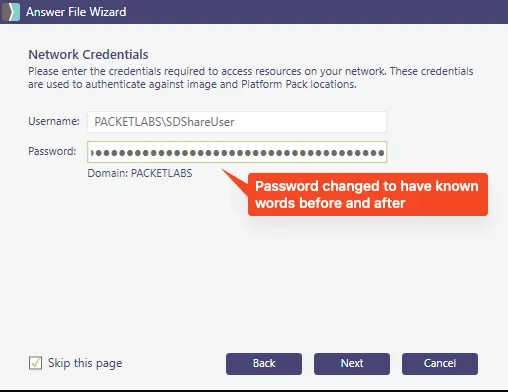
Figure 10. Password Modified to Contain Known Substrings
Typically, in the credential access phase of our attack cycle, lsass.exe would be hard to target. But in this case, EDR systems typically do not monitor for other processes beyond lsass.exe.
Using Task Manager, a memory dump of the AnswerFileWizard.exe could be created in an attempt to find the PCKT string.
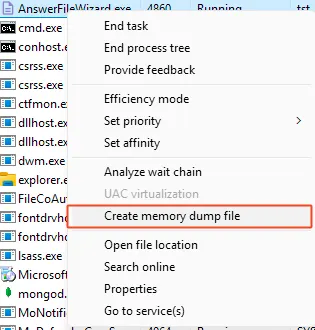
Figure 11. Memory Dump of Application
Using a tool like WinDBG it is possible to search the created file for the string “PCKT” using the command s -u 0 L? 00000fff’ffffffff “PCKT” which shows all results for that string.

Figure 12. WinDBG Used to Find PCKT
The plain-text password could then be recovered from this dump by reviewing the found address in memory.
SmartDeploy adds null bytes (00) between each letter of the password by removing those spaces and the PCKT from start and end, and the users plain-text password is recovered. This process can be repeated to retrieve local or domain credentials (these credentials can also be found in the XML files).
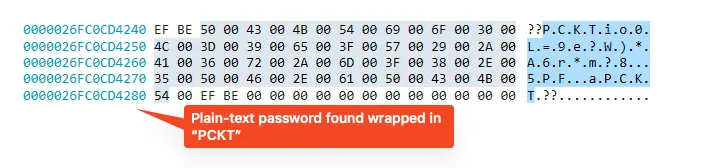
Figure 13. Plain-Text Password Recovered
Vulnerability 3: Recovery of the IV and Key for AES to Secrypt the auth.json File
In cryptography, a key is a secret value used to encrypt and decrypt data, effectively locking and unlocking protected information. An initialization vector (IV) is additional random input used alongside the key to strengthen encryption by preventing predictable patterns.
For SmartDeploy, the application was observed supplying both the key and IV at runtime to decrypt the auth.json file during startup. By attaching a debugger to the running process, it was possible to extract the key and IV directly from the application, enabling decryption of the file’s contents.
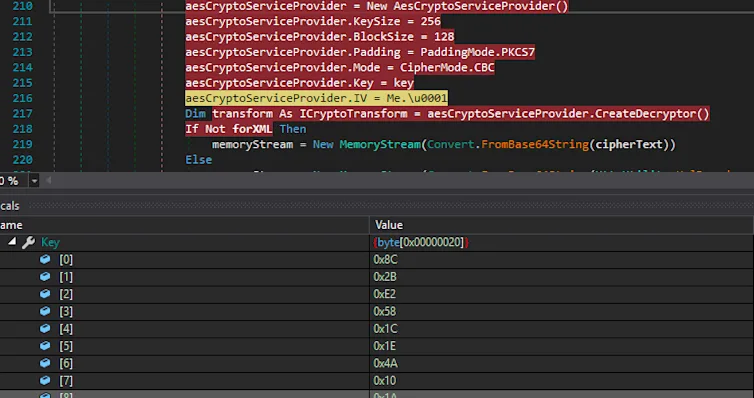
Figure 14. Recovering AES Key and IV from the Application
With the recovered key and IV, further analysis showed that the auth.json file is a Base64-encoded, AES-encrypted JSON object. Using a tool such as CyberChef, the file could be decoded and decrypted, allowing the embedded account information, including the password field, to be fully recovered in plaintext.
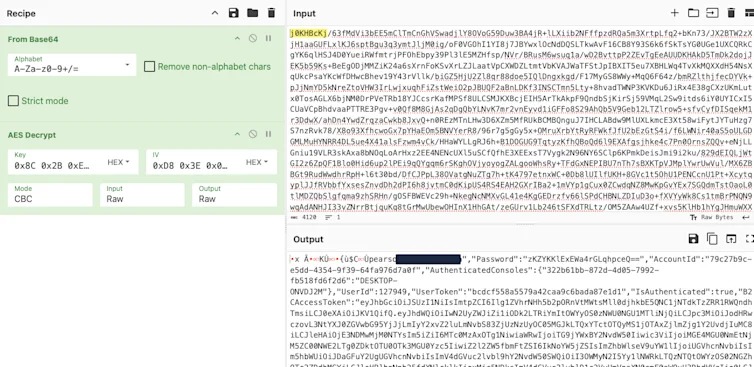
Figure 15. Decrypting auth.json
The auth.json file contains a JWT token which has a short expiry but can provide information about the user's account. A password field which can be decrypted using the same Base64 decoding and AES decrypt. Additionally, the json contains a service account created for the machine and its password.
The password can be used to log in to the SmartDeploy portal, which can then be used to manage the application. While the license used throughout the test was a trial it does not appear that MFA is used to access this portal.
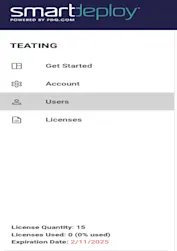
Figure 17. Access to the SaaS Portal by using the JWT
Conclusion
Organizations using PDQ SmartDeploy should review PDQ’s release notes and remediation guidance and ensure they are running version 3.0.2046 or later.
Similar classes of vulnerabilities were identified in other enterprise products, underscoring that these issues are not unique to a single vendor. Product teams should re-evaluate how credentials are stored, protected in memory, and exposed during application runtime.
For offensive security practitioners, this serves as a reminder to closely examine custom-developed and third-party enterprise tooling, which is frequently overlooked by vulnerability scanners and automated assessments despite often running with elevated privileges.
From a defensive perspective, detection strategies should extend beyond monitoring lsass.exe access alone. Teams should seek earlier indicators of compromise, including anomalous memory access or dumping activity across non-standard processes.
Disclosure Timeline
2025-05-13 – Initial disclosure to PDQ at the security@pdq.com email.
2025-05-22 – Reached out via Discord. PDQ confirmed receipt.
2025-05-23 – Packetlabs disclosed this write-up to PDQ.
2025-06-02 – Ticket was created and was sent over to the security team.
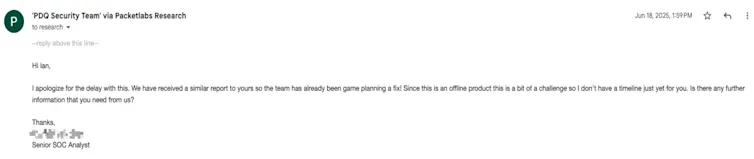
2025-06-18 – PDQ informed Packetlabs that a similar report was received a little earlier and indiciated that the team was working on a fix.
2025-06-19 – Packetlabs informed PDQ that we operated on a 90-day disclosure policy aiming to publish at around September.
2025-07-02 – PDQ confirmed receipt, and planned to have this fixed by the end of the month.
2025-07-16 – PDQ requested an extension to the disclosure timeline.
2025-07-16 – PDQ informed that a fix is in place but through their QA and aimed to have an estimated completion timeline of August 4.
2025-08-07 – PDQ released patched version 3.0.2046
2025-08-12 – PDQ confirmed that the earlier report was published from SpecterOps.
Packetlabs felt that once the risk was open to the public with the MITRE assignment, there was less of a need to push on this blog entry.
2026-01-16 – Packetlabs public disclosure.
Contact Us
Speak with an Account Executive
Interested in Pentesting?

Penetration Testing Methodology
Our Penetration Security Testing methodology is derived from the SANS Pentest Methodology, the MITRE ATT&CK framework, and the NIST SP800-115 to uncover security gaps.
Download Methodology
Pentest Sourcing Guide
Download our Pentest Sourcing Guide to learn everything you need to know to successfully plan, scope, and execute your penetration testing projects.
Download GuideExplore in-depth resources from our ethical hackers to assist you and your team’s cyber-related decisions.
September 13 - Blog
Why Multi-Factor Authentication is Not Enough
Knowing is half the battle, and the use and abuse of common frameworks shed insight into what defenders need to do to build defense in depth.

November 19 - Blog
The Top Cybersecurity Statistics for 2024
The top cybersecurity statistics for 2024 can help inform your organization's security strategies for 2025 and beyond. Learn more today.
October 24 - Blog
Packetlabs at SecTor 2024
Packetlabs is thrilled to have been a part of SecTor 2024. Learn more about our top takeaway's from this year's Black Hat event.